User guide
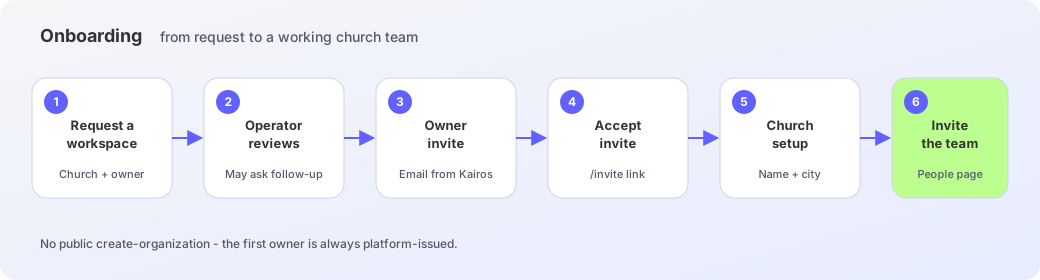
Accept an invite, finish church setup, walk Sunday’s sermon and the church library, then explore later ministry flows as workspace previews.
Kairos is a church workspace for pastors and ministry workers. Claim the church, invite the team, and carry last Sunday’s recording through transcript review into a small-group guide and a week of study. Knowledge Flow is live for the library and Ask Kairos. Learning, Volunteer, Asset, and Ministry Flow appear in the sidebar as working previews with sample data — walk the screens in this guide, but keep real enrollments, serving lists, bookings, and care notes where the church already trusts the record until Status says the module is live.
Who this is for
Owners who just received a platform invite, org admins who invite the team, pastors who preach, and ministry workers who run Sermon Flow. Members can read along; they do not set up the church.
How this guide is organized
Start with first steps if you are new. Use Sunday workflow when last week’s recording is ready. Knowledge Flow is live for the church library and Ask Kairos. Later flows have full guide pages that match the preview screens in the workspace.
- Getting started — request, invite, sign-in, and church setup.
- Sunday workflow — Sermon Flow from channel import to transcript, glossary, and seven-day study.
- Ministry flows — Knowledge is live; Learning, Volunteer, Asset, and Ministry are documented as previews.
- Workspace — people, roles, Member QR, language, and theme.
What Kairos does not do
Kairos does not preach for you. You still approve the transcript, edit the small-group guide, and decide what the congregation hears. Discernment stays with the human.