Learning Flow
Turn teaching into programs, courses, enrollments, graded work, and certificates — preview screens with sample data.
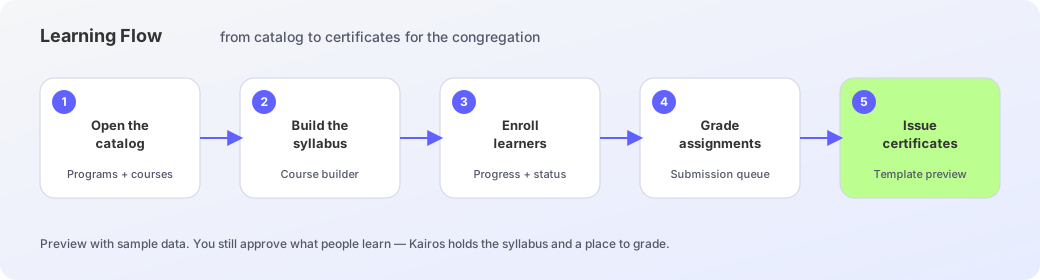
Learning Flow is the academy beside Sermon Flow. Browse programs and courses, build a syllabus from teaching the church already owns, enroll learners, grade assignments, and review a certificate template. You still shape what people learn — Kairos holds the syllabus and a place to grade.
Catalog and programs
Open Learning Flow for Catalog and programs. Active programs show length and enrollment counts. The course library lists published and draft courses — open a card to see lessons, learners, and the syllabus.
Build a course
Course builder drafts modules and lessons beside a source library of sermons. Use a sermon for AI suggestions — discussion questions, readings, quizzes — then add them to the syllabus. Save draft or publish when the outline is ready.
Enroll and grade
Student enrollments tracks progress and certificate status. Assignments and grading opens a submission queue — pick a paper, read it, and leave a grade. Until the module is live, treat these rows as sample learners, not your real cohort.
Issue certificates
Review certificate shows a preview with classic, modern, or minimal templates. Toggle hours, then send when a learner finishes the path. Preview data only — do not mail a sample certificate as an official award.
Academy path
- 1
Open the catalog
Browse programs and courses. Start a new program when you need a cohort shell.
- 2
Build the syllabus
In Course builder, add modules and pull suggestions from a sermon source.
- 3
Enroll learners
Use Student enrollments to see progress and certificate status.
- 4
Grade the work
Open Assignments and grading, review a submission, and leave a grade.
- 5
Review the certificate
Choose a template and send only when the award is real — not on sample rows.